Parametric CAD · Windows · Offline
Describe the part.
Get geometry you can still edit.
PromptCAD turns a sentence into a real feature tree — a box, a cut, a fillet, each one a node with editable properties. Then it measures the solid it built against the numbers you asked for.
Model
Properties — Box
- Length
- 60.00 mm
- Width
- 40.00 mm
- Height
- 10.00 mm
A 60 × 40 × 10 mm mounting plate with a 12 mm hole through the centre and 3 mm fillets on the vertical edges.
Plan · 4 operations
- box60 × 40 × 10
- cylinder⌀12 h10
- cutbox − cylinder
- filletr3 · 4 edges
✓ Measured 60.00 × 40.00 × 10.00,
bore ⌀12.00 — matches the prompt.
The difference
A shape is easy. A shape you can still change is the hard part.
Most language-driven 3D tools hand back a surface. It looks right, and then the first revision costs you the whole thing. PromptCAD is built the other way round.
Mesh generation
A finished surface
- Thousands of triangles with no idea that a hole is a hole.
- Changing a dimension means sculpting, or starting again.
- Sizes are whatever came out of the model.
- Exports as a mesh, so curves arrive faceted.
PromptCAD
A parametric feature tree
- Four named features — box, cylinder, cut, fillet — each editable.
- Change the box width and everything downstream rebuilds.
- Dimensions are read back out of the solid and compared to the prompt.
- Exports as STEP, so curves stay curves.
How it works
Five stages, and none of them generate a mesh.
The pipeline is deliberately narrow. The model never writes free-form code and never touches the geometry kernel directly — it proposes operations, and PromptCAD builds them.
-
You describe the part
Plain English, in the panel. Three ways to work: Structured for a whole part at once, Engineering to add one operation at a time and watch each step land, and Python when you would rather write the script yourself.
-
The model returns a plan, not code
The answer has to be a list of operations drawn from a fixed vocabulary of 19, each with typed and validated parameters. That constraint is what makes the result editable instead of a one-shot blob.
Local models are held to it by a GBNF grammar, so malformed output is not merely rejected — it cannot be produced. Remote models use their structured-output modes.
-
PromptCAD builds the feature tree
Each operation becomes a real FreeCAD object. A plate with a bored hole and filleted edges is a box, a cylinder, a cut and a fillet — four nodes, each with editable properties, in the order they were applied.
-
It measures what it built
After building, PromptCAD inspects the actual solid: bounding box, volume, and a measurement table per feature. Then it reads the dimensions back out of your prompt and compares them with the geometry. Ask for 60 mm and get 6 mm, and it says so rather than handing you a confident wrong part.
-
It repairs its own mistakes, within limits
When an operation fails or a check does not pass, the error goes back to the model and it tries again — under a fixed repair budget with a loop guard. It gives up and tells you, rather than spinning.
One prompt, end to end
“A 60 × 40 × 10 mm mounting plate with a 12 mm hole through the centre and 3 mm fillets on the vertical edges.”
The plan
- 01box60 × 40 × 10
- 02cylinder⌀12, h 10, centred
- 03cutbox − cylinder
- 04filletr 3, vertical edges
The check
| Dimension | Asked | Built | |
|---|---|---|---|
| Length | 60.00 | 60.00 | ✓ |
| Width | 40.00 | 40.00 | ✓ |
| Thickness | 10.00 | 10.00 | ✓ |
| Bore ⌀ | 12.00 | 12.00 | ✓ |
| Fillet r | 3.00 | 3.00 | ✓ |
Four editable nodes, then a verdict. Open the Box and set the length to 80 and the cut, the fillet and the measurements all follow. Nothing here is baked in.
Vocabulary
Nineteen operations, and nothing outside them.
A closed vocabulary is what makes the output checkable. Anything the model proposes is either one of these, with parameters that pass validation, or it does not run.
Primitives
- box
- cylinder
- sphere
- cone
- torus
Profile based
- extrude
- revolve
Booleans
- cut
- fuse
- common
Arrays
- linear_pattern
- polar_pattern
- mirror
Edges & walls
- fillet
- chamfer
- shell
- hole
Placement
- translate
- rotate
The window
Minimal by default, complete when you want it.
PromptCAD is built on FreeCAD, which opens with nine toolbars and roughly eighty icons. That is the right default for CAD you drive with a mouse, and the wrong one for CAD you drive by describing things — the prompt ends up a narrow strip beside a wall of buttons it does not need.
So PromptCAD starts with one short toolbar row and gives the prompt real width. Nothing has been removed: one button — or Ctrl+Shift+T — brings the entire FreeCAD toolset back, and it remembers which way you like it.
Models
Bring your own model. It finds it by itself.
PromptCAD ships without weights, so the download stays small and you are never locked to one vendor's model. Download a model and PromptCAD picks it up — there is no settings dialog to hunt through and no path to paste.
-
Install PromptCAD
One installer, including the inference engine. Nothing downloads behind your back later.
-
Download a model
Click a button below. Your browser saves it to Downloads — that is fine, leave it exactly there.
-
Start PromptCAD
It finds the file, selects it, and lists it in the dropdown at the top of the panel.
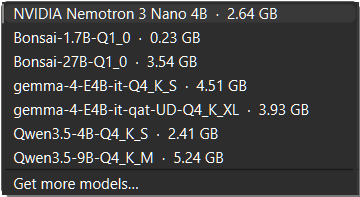
Already have models? If you use LM Studio or Ollama,
PromptCAD lists those as well. A part-finished download is skipped on
purpose — PromptCAD checks the size first, because a truncated
.gguf fails deep inside the inference engine with an error
that explains nothing.
Where it looks. Any of these. Drop a file in one and it is found on the next start.
%USERPROFILE%\Downloads <install folder>\models %APPDATA%\PromptCAD\<version>\models %USERPROFILE%\.lmstudio\models %USERPROFILE%\.machine\models
Compact models
Runs on the machine in front of you.
Quantised GGUF builds. As a rule of thumb the download size is roughly the memory the model needs while running.
Nemotron 3 Nano 4B
RecommendedNVIDIA
The default, and the model PromptCAD's prompts are tuned against. It is a reasoning model — it works through the problem before it answers — which is what makes it good at multi-step geometry.
- Download
- 2.84 GB
- Memory
- 8 GB
- Quant
- Q4_K_M
- Licence
- NVIDIA Open Model
Gemma 4 12B
Google DeepMind
Noticeably stronger on multi-step geometry — assemblies, chained booleans, a whole part described in one long paragraph. Comfortable with 16 GB of memory or a GPU.
- Download
- 7.66 GB
- Memory
- 16 GB
- Quant
- Q4_K_M
- Licence
- Gemma Terms of Use
Measured, so you know what to expect. With the recommended 4B model and the bundled CPU build of llama.cpp on an eight-core desktop: the model loads in about nine seconds, then generates roughly 1.5 tokens per second.
A GPU moves that by an order of magnitude, and PromptCAD uses one automatically when it is there. Pointing it at an API provider does the same.
Higher-memory models
The open-weights frontier, same plan format.
These are the large open-weights releases. Run them locally if your machine has the memory, or reach them through any of the API providers below — PromptCAD asks for the same structured plan either way, so the feature tree, the measurements and the exports are identical.
GLM-5.2
Higher memoryZ.ai / Zhipu AI
A 744B mixture-of-experts released under the MIT licence, with a one-million-token context — room for a long, detailed part description and the whole conversation around it.
- Parameters
- 744B MoE
- Context
- 1M tokens
- Licence
- MIT
- Weights
- Open
Inkling
Higher memoryThinking Machines Lab
975B total parameters with 41B active, and multimodal — the leading open-weights release from a US lab.
- Parameters
- 975B total
- Active
- 41B
- Modality
- Text + vision
- Licence
- See model card
Inkling-Small
Higher memoryThinking Machines Lab
The efficient variant — comparable quality at about a quarter the size, and roughly 140 GB once quantised.
- Parameters
- 276B total
- Active
- 12B
- Quantised
- ~140 GB
- Licence
- See model card
Providers
Local by default. Seven ways in.
Local is the default because your geometry stays yours. But model lists are fetched live from each provider rather than hardcoded — so a model released this morning is selectable this afternoon.
- Local Bundled llama.cpp, GGUF, offline
- Ollama Your existing server
- LM Studio Shares its model library
- Anthropic Claude
- OpenAI GPT
- Google Gemini
- xAI Grok
- OpenRouter Everything else, one key
Output
Getting the part out.
Because the result is real B-rep geometry rather than a mesh, it exports as real geometry.
- STEPExact B-rep for CAD and CAM interchange. Curves stay curves — nothing is faceted on the way out.
- STLFor printing and preview, with the mesh tolerance under your control.
- 3D print modeGive it your build volume and PromptCAD checks the part against it, and can scale to fit.
- TemplatesSave a part you like as a template and start the next one from it.
Requirements
What it needs.
- SystemWindows 10 or 11, 64-bit.
- DiskAbout 2.5 GB installed, plus whatever your model needs.
- Memory8 GB for the recommended 4B model, 16 GB for 12B. More for the larger models above.
- GPURecommended for local models, and used automatically when one is present.
- NetworkOnly to download PromptCAD and a model. After that it works offline.
PromptCAD 1.2.0
One installer, including FreeCAD and the inference engine. No account, no telemetry, and nothing downloads behind your back afterwards.
PromptCAD-1.2.0-setup.exe · 464,863,048 bytes
SHA-256 119d1c0eb956decf4b4ef91f989d314eb661a97ff5849391afe5ec4e43d51b90
Licensing
PromptCAD is built on FreeCAD,
redistributed unmodified under the LGPL-2.1-or-later, and includes
llama.cpp under the MIT
License. PromptCAD's own code is MIT. The full notices and a written offer
for source ship in the application's legal folder and in the
repository.
FreeCAD is a trademark of the FreeCAD Project Association. PromptCAD is an independent project, not affiliated with or endorsed by them — please report PromptCAD problems to PromptCAD.
No model weights are distributed with PromptCAD. Each model above is published by its own authors under its own licence, and that licence governs your use of it.